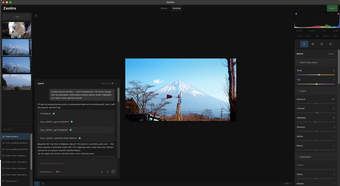
zenliro: MCP server for assistant-driven AI image creation
zenliro, by LeHoangTuanbk, is an MCP server that brings AI image generation and editing into assistant workflows. The tool bridges MCP-compatible clients to the Replicate API, enabling assistant-driven image creation and modification through model-backed requests. Key functions include generation, image transformation, and targeted editing exposed during conversations. Intended for developers, researchers, and power users, it provides a developer-oriented framework for integrating visual workflows into chat-based AI environments, with open-source code that supports local deployment.
What tasks can you actually use it for?
The server exposes image tools directly to MCP-connected assistants, letting models reference and manipulate visuals inside a chat session. Typical in-session actions include:
- sending a prompt to generate an image
- using an uploaded image as a reference for variations
- applying a mask to edit a specific area
How accurate are the generated images for production use?
Image fidelity tracks the processing model selected on the Replicate side. The app routes requests to the Flux family of models on Replicate, which the project highlights for higher-fidelity and prompt adherence. Output quality varies with prompt specificity and source image condition; precise prompts and high-resolution references produce clearer detail and closer adherence to instructions.
Does it require technical setup to run within a workflow?
Operation requires an MCP host (for example Claude Desktop), Node.js to run the TypeScript server, and a valid Replicate API token to authenticate requests. The server orchestrates calls while heavy compute runs in Replicate's cloud, so local hardware does not perform model inference even when the server code is deployed on a local machine. Deployment targets developer workflows rather than one-click end-user installs.
What privacy and operational trade-offs apply?
The server sends image generation and edit jobs to Replicate's cloud infrastructure, so files and prompts leave the host environment during processing. The app requires an API key for authenticated calls, which makes key management part of deployment planning. The package is well-regarded by the MCP developer community for reliability and the breadth of editing tools it exposes to assistant sessions.
A focused choice for developers who accept cloud-based processing
The app is a practical option for developers and researchers who need image creation and editing embedded in MCP-based assistant sessions, anchored to its MCP-first design and Replicate integration. Its developer-oriented setup matches teams comfortable with Node.js and API keys. Expect to manage external-processing trade-offs when handling sensitive content, and plan deployments around authenticated API access and cloud processing considerations.